Set team sales targets and assign individual sales

Share important files in each deal for more convenient collaboration
Set team sales targets and assign individual sales

Setting up total sales target for the team and assigning individual sales commission by following these steps:

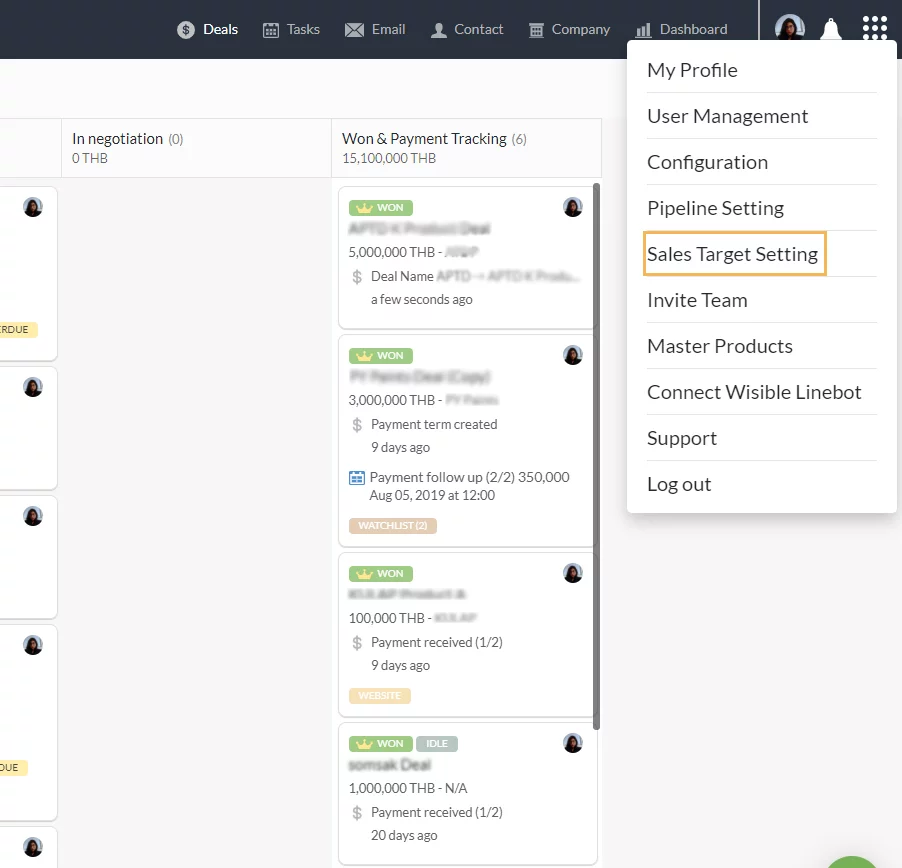
1. Entering sub-menu SALES TARGET SETTING

Go to top right corner of the screen, click on ‘Sales Target Setting’
2. Enter to ‘SALES TARGET SETTING’ page

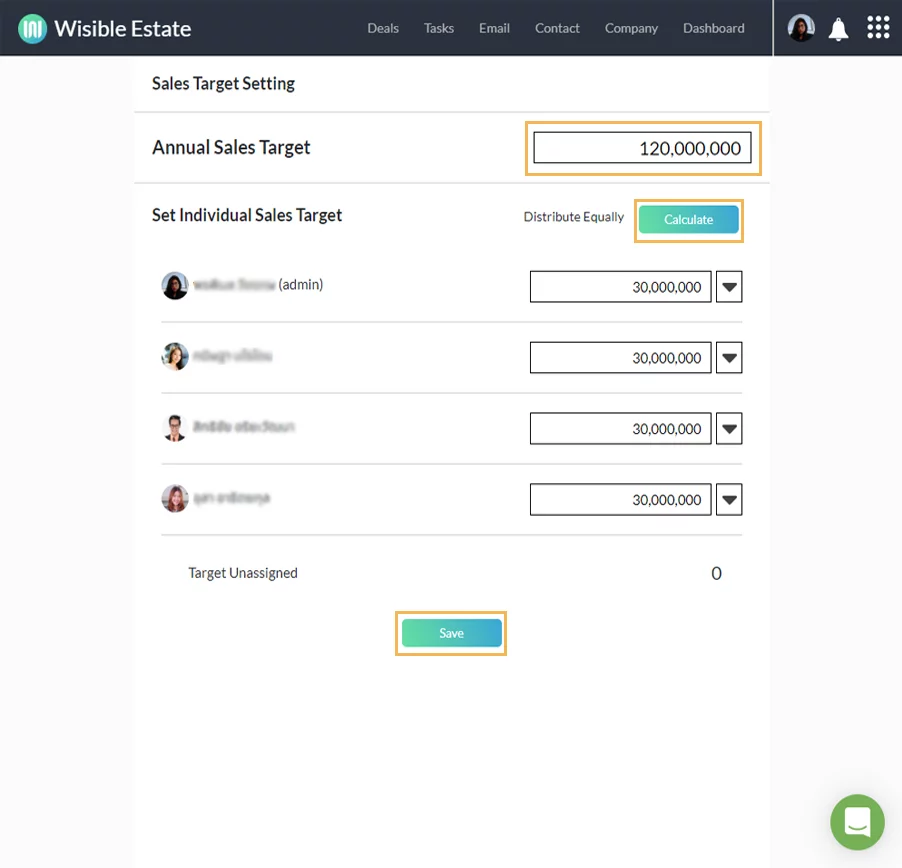
Fill in the target number for the total sales of your team into the ‘Annual Sales Target’ space and click ‘Calculate’ so that the system will distribute the sales target to your team evenly. Once done, click save to confirm your total sales target for your team.
3. Edit Target Individually

What if your team does not distribute the sales target evenly?

No worries, you can edit the total sales target of your team individually. You can simply edit the number at the end of the certain name or you can edit the monthly sales target of each member. Just click on the black dropdown arrow icon next to the total sales target amount of that particular member that you would like to edit, you will now be able to edit the target in each month as well.
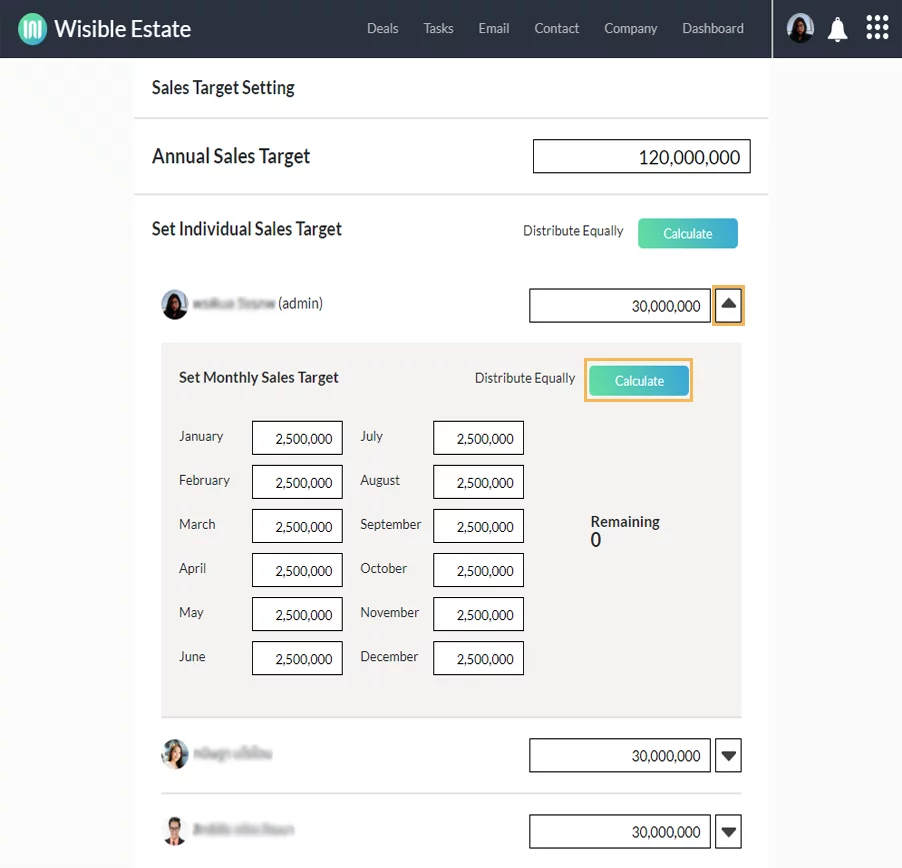
Once you have edited, do not forget to click ‘Save’ so that the dashboard will update to the current information.


Similar Posts

  • Setting Up for Quotation Usage

    To set up for Quotation Management Feature which is a special extra extension for working together with Master Product Feature so that your team can create a simple quotation by themselves by following these steps (For those who are using with Admin and Super Admin level only that will be allowed to set up this…

  • สร้างดีลใหม่อย่างรวดเร็วผ่าน Wisible assistant ใน Line

    หลังจากที่คุณ Connect Wisible Linebot เรียบร้อย คุณจะพบกับเมนู 6 เมนู ที่สามารถทำงานผ่าน Wisible Line assistant ได้มาเริ่มที่ลำดับแรก เมนูซ้ายสุดแถวบน สร้างดีลใหม่ (Add Deal) คุณสามารถสร้างดีลแบบเร่งด่วนผ่านเมนูดังกล่าวได้เพียงเเค่ตอบคำถามต่อไปนี้ให้ครบ คำถามที่สอง Deal is a company or a person กดเลือกว่าลูกค้าของคุณในดีลนี้เป็น บริษัท หรือบุคคลธรรมดา คำถามที่สาม Please enter the company name/ the person name พิมพ์ชื่อบริษัทหรือบุคคลที่เป็นลูกค้าในดีลนี้ของคุณ คำถามที่สี่ Please enter the deal value (number only) กรอกเฉพาะตัวเลขมูลค่าคาดคะเนของดีลนี้ลงไป หรือจะเลือกจากที่เราแนะนำก็ได้เช่นกัน คำถามที่ห้าเฉพาะ user ที่มีสิทธิ์เข้าถึง Pipeline มากกว่า 1…